---
### ONEW CE Collections
## ❓ What is CE Collections?
CE Collections gathers almost all the official images and emulators based on the CE kernel (such as Windows CE Core and Windows Mobile). The content includes:
- x86Bin images booted via Loadcepc.
- ArmBin images booted via DeviceEmulator.
- Shell emulators for Windows NT.
## 📥 How to Use
**This image can not only be booted in a virtual machine using the CEPC x86 image, but you can also run MENU2.EXE directly in Windows to launch other formats of images/emulators. Note that the supported Windows CE versions differ between these two platforms (direct boot and running from Windows)!**
How to use WinNT-Platform-Loader:
1. Load the ISO file into a virtual optical drive or virtual machine (Windows XP SP3 is recommended, because the Windows PPC 2000 emulator will not run on NT6.x).
2. Open MENU2.EXE located in the WNT folder at the root of the ISO.
3. Choose the desired Windows CE version and click Run to launch the corresponding emulator.
How to use CEPC Loader:
1. Load the ISO file to a virtual machine or emulator(such as 86Box,here is recommend settings).


 2. Turn the virtual machine on and boot the CD.
3. Choose the OS you want to boot.
4. If it ask you to choose a resolution,please choose that on-demand.
Note:
- When booting earlier versions of CE, the menu might ask whether to use high-resolution mode. This is because modern virtual machines cannot correctly emulate the graphics cards of that era, so early CE systems can only run in low resolution. If you wish to use high resolution, please use emulators like PCEM or 86Box that can emulate the period’s hardware (86Box with S3 ViRGE is recommended).
## ❓ QA
Q: After booting from the disc and selecting Windows CE 2.x through Windows 3.x, the screen goes black.
A: You might have chosen the wrong resolution. In virtual machines like VMware, you need to use low resolution mode; moreover, newer versions of VMware can be choppy when emulating older systems, which may also lead to a black screen.
Q: I have already used 86Box, but still can’t use high resolution.
A: In PCEM, you need to select the S3 ViRGE graphics card and use a CPU with performance equal to or better than a 486/33 to enable high resolution.
Q: I cannot boot the disc in 86Box.
A: Please use 7Zip or another compression tool to open the ISO file, extract the img file from the [boot] folder, and then boot from a floppy disk.
Q: Why isn’t the shutdown function working properly?
A: It simply doesn’t work.
Q: In the CEPC bootloader, after selecting a system, it shows “Error image section doesn't fit in allocated block”.
A: The memory might be set too low; please increase the memory allocation.
Q: After booting Windows EC 2013, the screen is black.
A: When creating the virtual machine, do not use VMware’s DOS mode. Instead, use Windows XP.
Q: The resolution options for Windows Mobile seem strangely confusing.
A: Please try other resolution options.
Q: The Shell Emulator cannot start multiple instances at the same time.
A: Please avoid launching multiple Shell Emulator instances simultaneously; if you accidentally do so, log off or restart, and then run “[CDROM]:\WNT\200HPC\ceu.reg”.
Q: Windows PPC 2000 doesn’t work on Windows Vista and later systems.
A: Due to Windows API incompatibilities, the best platform for Shell Emulator is Windows XP.
Q: My physical Windows CE/Mobile device doesn’t boot, can you help solve this? / Can you install this WinCE software for me?
A: Well, I can't answer that.
Q: Can you integrate other Windows systems?
A: Just look at the project name – the answer is self-evident.
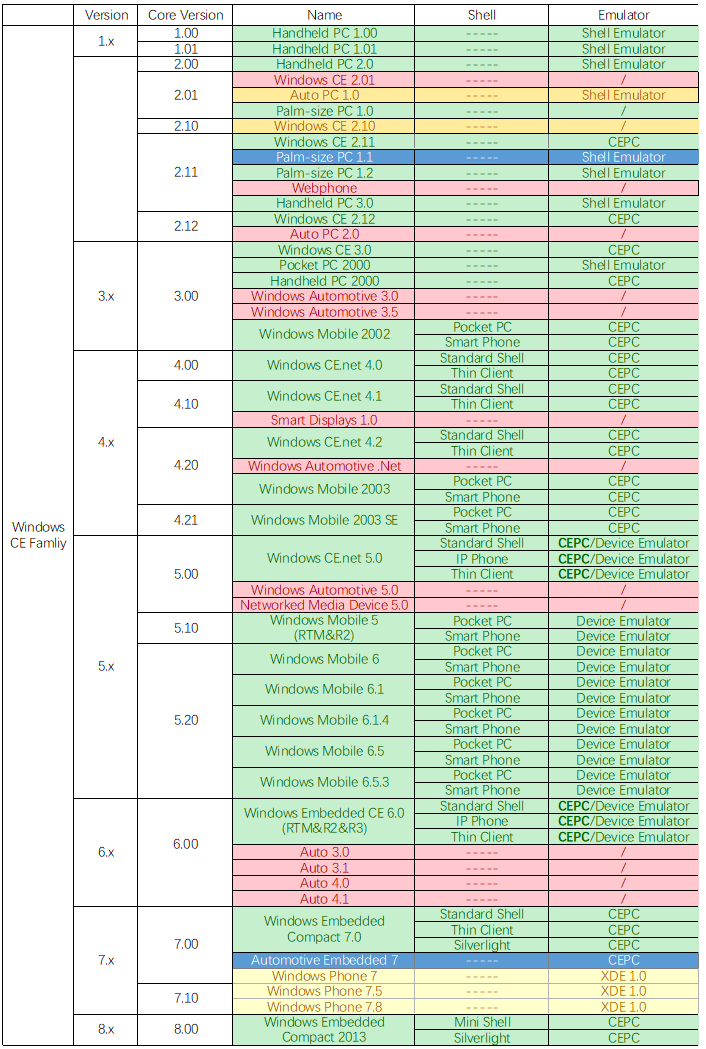
## ❗ CE Images and Emulators Integrated in this Project
The color codes below represent different statuses:
- 🟢 Green: Integrated
- 🔵 Blue: Integrated (but with some issues)
- 🟡 Yellow: Resources available and could be integrated, but not yet integrated.
- 🔴 Red: No resources available
2. Turn the virtual machine on and boot the CD.
3. Choose the OS you want to boot.
4. If it ask you to choose a resolution,please choose that on-demand.
Note:
- When booting earlier versions of CE, the menu might ask whether to use high-resolution mode. This is because modern virtual machines cannot correctly emulate the graphics cards of that era, so early CE systems can only run in low resolution. If you wish to use high resolution, please use emulators like PCEM or 86Box that can emulate the period’s hardware (86Box with S3 ViRGE is recommended).
## ❓ QA
Q: After booting from the disc and selecting Windows CE 2.x through Windows 3.x, the screen goes black.
A: You might have chosen the wrong resolution. In virtual machines like VMware, you need to use low resolution mode; moreover, newer versions of VMware can be choppy when emulating older systems, which may also lead to a black screen.
Q: I have already used 86Box, but still can’t use high resolution.
A: In PCEM, you need to select the S3 ViRGE graphics card and use a CPU with performance equal to or better than a 486/33 to enable high resolution.
Q: I cannot boot the disc in 86Box.
A: Please use 7Zip or another compression tool to open the ISO file, extract the img file from the [boot] folder, and then boot from a floppy disk.
Q: Why isn’t the shutdown function working properly?
A: It simply doesn’t work.
Q: In the CEPC bootloader, after selecting a system, it shows “Error image section doesn't fit in allocated block”.
A: The memory might be set too low; please increase the memory allocation.
Q: After booting Windows EC 2013, the screen is black.
A: When creating the virtual machine, do not use VMware’s DOS mode. Instead, use Windows XP.
Q: The resolution options for Windows Mobile seem strangely confusing.
A: Please try other resolution options.
Q: The Shell Emulator cannot start multiple instances at the same time.
A: Please avoid launching multiple Shell Emulator instances simultaneously; if you accidentally do so, log off or restart, and then run “[CDROM]:\WNT\200HPC\ceu.reg”.
Q: Windows PPC 2000 doesn’t work on Windows Vista and later systems.
A: Due to Windows API incompatibilities, the best platform for Shell Emulator is Windows XP.
Q: My physical Windows CE/Mobile device doesn’t boot, can you help solve this? / Can you install this WinCE software for me?
A: Well, I can't answer that.
Q: Can you integrate other Windows systems?
A: Just look at the project name – the answer is self-evident.
## ❗ CE Images and Emulators Integrated in this Project
The color codes below represent different statuses:
- 🟢 Green: Integrated
- 🔵 Blue: Integrated (but with some issues)
- 🟡 Yellow: Resources available and could be integrated, but not yet integrated.
- 🔴 Red: No resources available
 ## ℹ About
This project is developed collaboratively by members of ONEW.
## ℹ About
This project is developed collaboratively by members of ONEW.
ONEW Studio QQ Group: 981893945 — Welcome to join!
This project has incorporated code/resources from the following projects:
CE:
- Most images have been compiled by us using Platform Builder.
- Some emulators/images are sample versions or directly extracted from the Microsoft SDK.
- The x86CEPC Bootloader (LOADCEPC) and tools are modified versions of the official Microsoft 6.0 edition.
Others:
- DOS-LOGO: http://retro.timb.us/Documents/Software/DOS-LOGO.html
## ❗ SDKs and Other Related Tools Download
### Windows CE 1.x
#### Windows CE 1.0x
[Microsoft Visual C++ For Windows CE Version 1.0](https://archive.org/details/msvcceu.100)
### Windows CE 2.x
#### Windows CE 2.00
[Microsoft Handheld PC 2.0 Platform SDK](https://archive.org/details/wincesdk)
#### Windows CE 2.01
Microsoft Palm-size PC 1.0 Platform SDK: [Programming Windows CE Disc](https://archive.org/details/mspress_programmingwindowsce_0970002166)
Microsoft Auto PC 1.0 Platform SDK: [Windows CE Developers Conference DevCon 99 Conference CD](https://archive.org/details/windowscedevcon99conferencecd)
#### Windows CE 2.10
[Microsoft Windows CE 2.10 Enhancement Pack for Windows CE Embedded Toolkit](https://www.betaarchive.com/database/view_release.php?uuid=0bef77bc-078b-468d-9ed0-18c51508948d)
#### Windows CE 2.11
[Microsoft Windows CE 2.11 Platform Builder](https://archive.org/details/MicrosoftWindowsCEPlatformBuilder2.11Disc1.iso.7z)
[Microsoft Palm-size PC 1.1 Platform SDK](https://web.archive.org/web/20051218093617/http://download.microsoft.com/download/wincepalm/pdasdk/1.1/WCE/CN/PPC_SDK(CHS).zip)
Microsoft Palm-size PC 1.2 Platform SDK: [Windows CE Developers Conference DevCon 99 Conference CD](https://archive.org/details/windowscedevcon99conferencecd)
Microsoft Handheld PC 3.0(HPC Pro) Platform SDK: [Windows CE Developers Conference DevCon 99 Conference CD](https://archive.org/details/windowscedevcon99conferencecd)
#### Windows CE 2.12
[Microsoft Windows CE 2.12 Platform Builder](https://www.betaarchive.com/database/view_release.php?uuid=e73feaeb-c4dc-4915-9b16-1692c269d3b5)
### Windows CE 3.x
#### Windows CE 3.00
[Microsoft Windows CE 3.0 Platform Builder(Part 1)](https://archive.org/details/ms-wince-pb30)
[Microsoft Windows CE 3.0 Platform Builder(Part 2)](https://archive.org/details/ms-wince-pb30_5-11)
[Microsoft Pocket PC 2000(Palm-size PC 3.0) Platform SDK(Backup)](https://pan.baidu.com/s/14ykCvhJfTmiYzloPs6ApRg) Key:6zjx
[Microsoft Handheld PC 2000 SDK](https://archive.org/details/hpc2ksdkusa)
[Microsoft Smart Phone 2002 SDK](https://archive.org/download/windows-mobile-sdks-2023/smartphone_2002_sdk.exe)
[Microsoft Pocket PC 2002 SDK](https://archive.org/download/windows-mobile-sdks-2023/ppc2002_sdk.exe)
### Windows CE 4.x
#### Windows CE 4.00
[Microsoft Windows CE.net 4.0 Platform Builder Emulation Edition(Backup)](https://www.123pan.com/s/KDyhTd-zTPN3) Key:eGCt
[Microsoft Windows CE.net 4.0 Platform Builder](https://www.betaarchive.com/database/view_release.php?uuid=51000b20-9a15-4403-8b56-c3759aa682b7)
#### Windows CE 4.10
[Microsoft Windows CE.net 4.1 Platform Builder Emulation Edition](https://archive.org/details/winceemul41)
[Microsoft Windows CE.net 4.1 Platform Builder](https://www.betaarchive.com/database/view_release.php?uuid=fc6d66f5-e047-4303-9f0e-82e7f1de6645)
#### Windows CE 4.20
[Microsoft Windows CE.net 4.2 Platform Builder Emulation Edition](https://archive.org/details/winceemul42)
[Microsoft Windows CE.net 4.2 Platform Builder](https://www.betaarchive.com/database/view_release.php?uuid=2b657ca7-2b53-4aac-8b1e-446b5669fda9)
[Microsoft Windows Mobile 2003 SDK](https://archive.org/download/WMSDK/Microsoft%20Pocket%20PC%202003%20SDK.msi)
#### Windows CE 4.21
[Microsoft Windows Mobile 2003 SE Images](https://archive.org/download/WMSDK/WM2003SEimages.msi)
### Windows CE 5.x
#### Windows CE 5.00
[Microsoft Windows CE.net 5.0 Platform Builder](https://archive.org/details/en_win_ce_net_cd1)
#### Windows CE 5.10
[Microsoft Windows Mobile 5.0 SDK](https://archive.org/download/WMSDK/Windows%20Mobile%205.0%20Pocket%20PC%20SDK.msi)
#### Windows CE 5.20
[Microsoft Windows Mobile 6 Professional SDK](https://archive.org/download/WMSDK/Windows%20Mobile%206%20Professional%20SDK%20Refresh.msi)
[Microsoft Windows Mobile 6 Standard SDK](https://archive.org/download/WMSDK/Windows%20Mobile%206%20Standard%20SDK%20Refresh.msi)
[Microsoft Windows Mobile 6.1 Standard Images](https://web.archive.org/web/20130330025109/http://download.microsoft.com/download/d/c/7/dc73c8e7-f9c3-49de-821f-5588eeefcac4/Windows%20Mobile%206.1%20Standard%20Images%20(USA).msi)
[Microsoft Windows Mobile 6.1 Professional Images](https://web.archive.org/web/20130330025531/http://download.microsoft.com/download/d/c/7/dc73c8e7-f9c3-49de-821f-5588eeefcac4/Windows%20Mobile%206.1%20Professional%20Images%20(USA).msi)
[Microsoft Windows Mobile 6.1.4 Professional Images](https://archive.org/download/WMSDK/Windows%20Mobile%206.1.4%20Professional%20Images%20%28USA%29.msi)
[Microsoft Windows Mobile 6.1.4 Standard Images](https://archive.org/download/WMSDK/Windows%20Mobile%206.1.4%20Standard%20Images%20%28USA%29.msi)
[Microsoft Windows Mobile 6.5 Professional DKT](https://archive.org/download/WMSDK/Windows%20Mobile%206.5%20Professional%20Developer%20Tool%20Kit%20%28USA%29.msi)
[Microsoft Windows Mobile 6.5 Standard DKT](https://archive.org/download/WMSDK/Windows%20Mobile%206.5%20Standard%20Developer%20Tool%20Kit%20%28USA%29.msi)
[Microsoft Windows Mobile 6.5.3 Professional DKT](https://archive.org/download/WMSDK/Windows%20Mobile%206.5.3%20Professional%20DTK.msi)
[Microsoft Windows Mobile 6.5.3 Standard DKT](https://archive.org/download/WMSDK/Windows%20Mobile%206.5.3%20Standard%20DTK.msi)
### Windows CE 6.x
#### Windows CE 6.00
[Microsoft Windows Embedded CE 6.0 Platform Builder](https://archive.org/details/en_windows_embedded_ce_6.0_dvd)
[Microsoft Windows Embedded CE 6.0 Platform Builder R2](https://archive.org/details/windows-embedded-ce-6.0-r2)
[Microsoft Windows Embedded CE 6.0 Platform Builder R3](https://archive.org/details/en_windows_embedded_ce_6.0_r3_dvd__x16-28730)
### Windows CE 7.x
#### Windows CE 7.00
[Microsoft Windows Embedded Compact 7.0 Platform Builder](https://archive.org/details/WindowsEmbeddedCompact7)
[Microsoft Windows Embedded Automotive 7.0 Platform Builder](https://archive.org/details/windows-embedded-automotive-7)
### Windows CE 8.x
#### Windows CE 8.00
[Microsoft Windows Embedded Compact 2013 Platform Builder](https://archive.org/details/en_windows_embedded_compact_2013_x86_x64_dvd_2247108)
Copyright 351Workshop 2022-2024