
26 KiB

CE Collections -2.02-
不止一个合集
English version: https://github.com/WindowsNT351/CE-Collections/blob/main/README_EN.md
✏️ 什么是 CE Collections
CE Collections 集合了几乎所有基于 CE 内核的官方Windows版本(例如 Windows CE Core,Windows Mobile,Windows Phone等)的镜像和模拟器。
镜像包括:
- 使用 Loadcepc 引导的 x86Bin 镜像
- 使用 DeviceEmulator 引导的 ArmBin 镜像
- 使用 XDE Emulator 引导的 ArmBin 镜像
模拟器包括:
- 适用于 Windows 7-11 的 Whitebox 模拟器
- 适用于 Windows XP-11 的 Arm DeviceEmulator 模拟器
- 适用于 Windows 7 - 8.1 的 XDE Emulator 模拟器
- 适用于 Windows NT(4.0-11,部分版本不支持新的Windows版本) 的独立 Shell 模拟器
📥 如何使用
WinNT平台模拟器使用方法
- 在插入光盘之前,启动宿主操作系统(NT4.0-Win11)。
- 插入光盘并等待弹出菜单,如果没有,运行[CD(DVD)ROM]:\WNT\Menu3.exe。
- 选择要启动的操作系统(模拟器)。注意,当使用不同的主机操作系统时,会有一些不同的限制。
- Windows NT 4.0 可用Shell Emulator,这是Shell Emulator的最佳宿主操作系统。
- Windows 2000 - XP 可以Shell Emulator(x64宿主系统上不能运行Auto PC 1.0)和ARM DeviceEmulator。
- Windows 7 - 8.1 可用Shell Emulator(Pocket PC 2000和x64宿主系统上的Auto PC 1.0除外)ARM DeviceEmulator、XDE Emulator和Whitebox Emulator。
- Windows 10 - 11 可用Shell Emulator(Pocket PC 2000和x64宿主系统上的Auto PC 1.0除外)ARM DeviceEmulator和Whitebox Emulator。
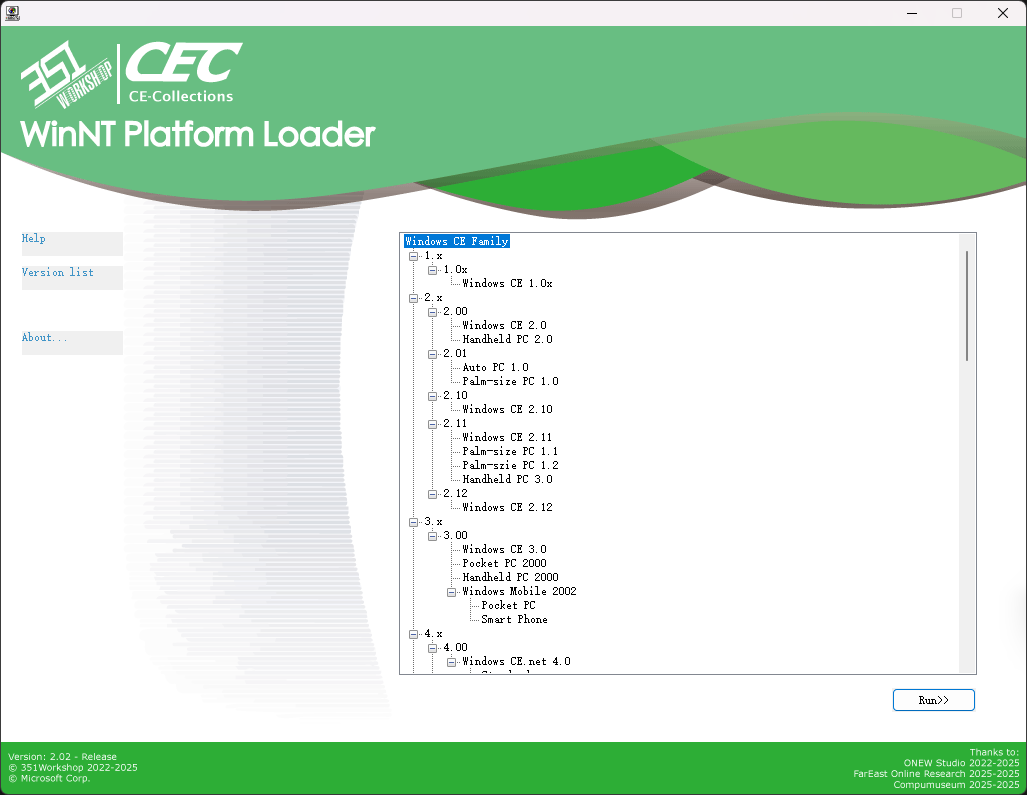
- 完成!
CEPC平台使用方法
注意!CEPC平台并不能启动全部镜像或模拟器。
- 插入光盘(或启动软盘)并从中启动。
- 选择要启动的操作系统,[下一页]和[上一页]按键位于右下角和左下角。注意,启动镜像时存在一些限制。
- 全部镜像
- 请使用大于64MB以上的内存,否则有些过大的镜像不能装载进内存或可用运行用内存过小,推荐使用128MB。
- Windows CE 2.0-2.10
- 对于PCem、VMware、VBox、Qemu现代实体机或其他现代虚拟机,这些镜像无法正常启动。
- 对于86Box,请使用WinChip CPU,并关闭动态重编译器。
- 对于实体机,请使用486或Pentium(586)CPU。

- 选择想使用的分辨率或确认启动。请注意,启动镜像有时存在一些限制。
- VGA8BPP显示驱动:
- 对于VMware、VBox、Qemu或其他现代虚拟机,只能使用低分辨率模式。
- 对于86Box PCem或实体机,务必使用S3视频卡(WinCE2.0使用S3Trio64,其他版本使用S3Virge),这样能开启高分辨率,否则只能使用低分辨率。
- Windows Mobile 的VESA显示驱动:
- 由于Windows Mobile显示为竖向,有些显卡在遇到此分辨率时会显示错误,发生这种情况时请尝试使用另一个分辨率。
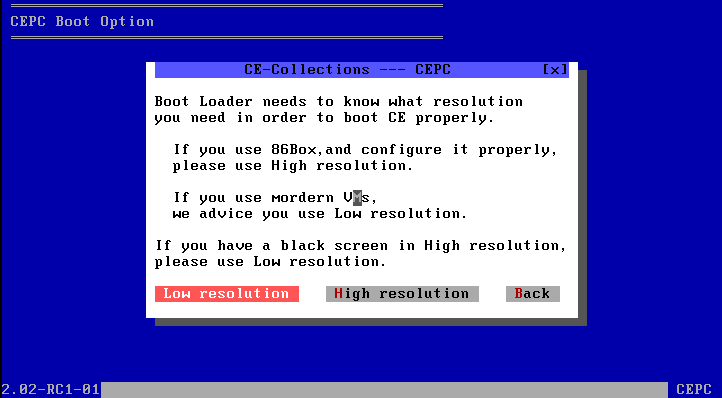

- 由于Windows Mobile显示为竖向,有些显卡在遇到此分辨率时会显示错误,发生这种情况时请尝试使用另一个分辨率。
- 完成!
🔧 CE-Collections 各部分是如何工作的
WinNT Platform
- 插入光盘,自动打开[CD(DVD)ROM]:\WNT\Menu3.exe
- Menu3.exe加载显示[CD(DVD)ROM]:\WNT\menu.enus配置文件,加载[CD(DVD)ROM]:\CECV20.D0版本配置文件。
- 选择要启动的模拟器/镜像
- Shell Emulator类
- 使用shellmgr [模拟器种类] [路径] [主程序名称]。
- shellmgr将模拟器复制到系统(用户)TEMP文件夹。
- shellmgr检测宿主系统是否符合当前模拟器。
- shellmgr对于不同模拟器做准备工作。
- WinCE 1.0: 设置需要的环境变量
- HPC/PPC 2.x: 替换模板注册表内模拟器路径,合并注册表
- PPC 2000: 替换模板注册表内模拟器路径,合并注册表(不同的目录结构)
- APC 1.0: 替换模板注册表内模拟器路径,合并注册表,加载WCEFS.sys驱动,如果是Windows Vista以上系统,循环终止ApcHook.sys(如果不终止会导致系统蓝屏)。
- shellmgr启动对应的主程序。
- shellmgr等待主程序关闭。
- shellmgr卸载装载的驱动,删除临时文件。
- ARM DeviceEmulator类
- 直接使用DeviceEmulator /video [适用于本镜像的分辨率] /memsize 256
- CEPC WhiteboxEmulator类
- 直接使用Whitebox [分辨率选择,见CEPC,相比于DOSCEPC,此处区分更详细] /M:[对应的86Box配置文件] [NK.bin]
- XDE Emulator类
- 使用xdemgr [XDE版本] [NK.bin]。
- xdemgr检测宿主系统是否符合当前模拟器。
- xdemgr复制XDE的VMM.sys(系统为32位)或VMM64.sys(系统为64位)到TEMP文件夹并加载。
- xdemgr复制XDE的配置文件到TEMP文件夹。
- xdemgr启动XDE模拟器。
- xdemgr等待XDE关闭。
- xdemgr卸载驱动,删除临时文件。
CEPC Platform
- 插入光盘/启动软盘,并从中引导至MS-DOS 7.1。
- 加载LOGO.sys显示启动logo。加载光驱驱动(IDE)。
- 检测D:是否为CE-Collections光盘,若不是,遍历寻找。
- 打开[CD(DVD)ROM]:\DOS\Menu.bat,加载[CD(DVD)ROM]:\CECV20.D0版本配置文件。
- 用户选择启动的镜像。
- 自动检测选择的镜像为何种镜像(2.0-2.10/2.11-2.12 HPC2000/3.0-2013/WinMobile)。
- 2.0-2.10
- 显示警告提示框。
- 使用Loadcepc /D:3 [NK.bin]
- 2.11-2.12 HPC2000
- 显示分辨率选择提示框。
- 高分辨率使用Loadcepc /D:3 [NK.bin] 低分辨率使用Loadcepc /D:0 [NK.bin](此分辨率几乎不可用)
- 3.0-2013
- 显示确认启动提示框。
- 使用Loadcepc /L:800x600x16 [NK.bin]
- WinMobile
- 显示分辨率选择提示框。
- 修复分辨率使用Loadcepc /L:175x240x16 [NK.bin] 原始分辨率使用Loadcepc /L:320x400x16 [NK.bin]
Loadcepc是什么?
Loadcepc是Windows CE x86镜像的引导器(Bootloader),起到将NK.bin加载至内存,设置显示分辨率,跳转到指定地址的作用。 DOS只是CE启动的跳板,CE启动后,DOS提供的中断例程和驻留在内存的程序将不可用,x86CE不是基于DOS的。
❓ QA
Q: 在 86Box 或 PCem 中无法引导光盘
A: 请使用 7Zip 等压缩软件打开 ISO 文件,解压 [boot] 文件夹中的 img 文件,然后从软盘引导。
Q: 在 CEPC 引导器中选择完系统后显示 “Error image section doesn't fit in allocated block”
A: 内存可能设定过小,请适当调大内存。
Q: Windows EC 2013 引导后黑屏
A: 内存可能设定过小,请适当调大内存。
Q: 为什么我在WinNT Loader里面打开某个版本后没有反应?
A: 可能是窗口在Menu背后打开,或者宿主系统版本低于本模拟器所需的版本。
Q: 为什么整体内容是英文的?
A: 因为英文镜像资源较全,构建也较完善,所以选择了英文版镜像;菜单等内容也相应采用英文格式。
Q: 我的 Windows CE/Mobile 实体机无法启动,能帮忙解决吗? / 能帮我安装一下这个WinCE软件吗?
A: 无法回答。
Q: 你能把其他 Windows 系统集成进来吗?
A: 请看项目名称——答案自明。
🔨 本项目集成的 CE 镜像和模拟器
| CE-Collections Supporting | |||||
|---|---|---|---|---|---|
| Version | Core Version | Name | Shell | Emulator | |
| 1.x | 1.00 | Windows CE 1.00 | ----- | Shell Emulator | |
| 1.01 | Windows CE 1.01 | ----- | Shell Emulator | ||
| 2.x | 2.00 | Windows CE 2.0(or 2.01?) | ----- | CEPC | |
| Handheld PC 2.0 | ----- | Shell Emulator | |||
| 2.01 | Auto PC 1.0 | ----- | Shell Emulator | ||
| Palm-size PC 1.0 | ----- | Shell Emulator | |||
| 2.10 | Windows CE 2.10 | ----- | CEPC | ||
| 2.11 | Windows CE 2.11 | ----- | CEPC | ||
| Palm-size PC 1.1 (Simplified Chinese) |
----- | Shell Emulator | |||
| Palm-size PC 1.2 | ----- | Shell Emulator | |||
| Handheld PC 3.0 | ----- | Shell Emulator | |||
| 2.12 | Windows CE 2.12 | ----- | CEPC | ||
| 3.x | 3.00 | Windows CE 3.0 | ----- | CEPC | |
| Pocket PC 2000 | ----- | Shell Emulator | |||
| Handheld PC 2000 | ----- | CEPC | |||
| Windows Mobile 2002 | Pocket PC | CEPC | |||
| Smart Phone | CEPC | ||||
| 4.x | 4.00 | Windows CE 4.0 | Standard Shell | CEPC | |
| Thin Client | CEPC | ||||
| 4.10 | Windows CE 4.1 | Standard Shell | CEPC | ||
| Thin Client | CEPC | ||||
| 4.20 | Windows CE 4.2 | Standard Shell | CEPC | ||
| Thin Client | CEPC | ||||
| Windows Mobile 2003 | Pocket PC | CEPC | |||
| Smart Phone | CEPC | ||||
| 4.21 | Windows Mobile 2003 SE | Pocket PC | CEPC | ||
| Smart Phone | CEPC | ||||
| 5.x | 5.00 | Windows CE 5.0 | Standard Shell | CEPC | |
| IP Phone | CEPC | ||||
| Thin Client | CEPC | ||||
| Networked Media Device 5.0 | ----- | CEPC | |||
| 5.10 | Windows Mobile 5.0 | Pocket PC | Device Emulator | ||
| Smart Phone | Device Emulator | ||||
| Windows CE Famliy |
Windows Mobile 5.2 | Pocket PC | Device Emulator | ||
| Smart Phone | Device Emulator | ||||
| 5.20 | Windows Mobile 6.0 | Pocket PC | Device Emulator | ||
| Smart Phone | Device Emulator | ||||
| Windows Mobile 6.0.2 | Pocket PC | Device Emulator | |||
| Smart Phone | Device Emulator | ||||
| Windows Mobile 6.1 | Pocket PC | Device Emulator | |||
| Smart Phone | Device Emulator | ||||
| Windows Mobile 6.1.4 | Pocket PC | Device Emulator | |||
| Smart Phone | Device Emulator | ||||
| Windows Mobile 6.5 | Pocket PC | Device Emulator | |||
| Smart Phone | Device Emulator | ||||
| Windows Mobile 6.5.3 | Pocket PC | Device Emulator | |||
| Smart Phone | Device Emulator | ||||
| 6.x | 6.00 | Windows CE 6.0 (RTM&R2&R3) |
Standard Shell | CEPC | |
| IP Phone | CEPC | ||||
| Thin Client | CEPC | ||||
| NMD UI(5.0) | CEPC | ||||
| 7.x | 7.00 | Windows Embedded Compact 7.0 |
Standard Shell | CEPC | |
| Thin Client | CEPC | ||||
| Silverlight ThemeA | CEPC | ||||
| Silverlight ThemeB | CEPC | ||||
| Silverlight ThemeC | CEPC | ||||
| Silverlight ThemeD | CEPC | ||||
| Automotive Embedded 7 | ----- | CEPC | |||
| Windows Phone 7 | ----- | XDE 1.0 | |||
| Windows Phone 7 NoDo | ----- | XDE 1.0 | |||
| 7.10 | Windows Phone 7.5 | ----- | XDE "1.2" | ||
| Windows Phone 7.5 Refresh | ----- | XDE "1.2" | |||
| Windows Phone 7.8 | ----- | XDE "1.2" | |||
| 8.x | 8.00 | Windows Embedded Compact 2013 |
Mini Shell | CEPC | |
| Silverlight ThemeA | CEPC | ||||
| Silverlight ThemeB | CEPC | ||||
| Silverlight ThemeC | CEPC | ||||
| Silverlight ThemeD | CEPC |
ℹ 关于
开发团队 / 贡献者
|
主开发者 - 351 - 351Workshop@Bilibili 赞助 - IBM_Official@Bilibili - 蓬岸@知乎 |
镜像 / 开发工具提供 - IBM_Official@Bilibili - 蓬岸@知乎 - lucss21a@Discord 美工 - WinPad - とある科学の手机副屏@Bilibili |
协助开发 - Inter - -INTER_INIT-@Bilibili - Zesa - Zesa_IO1i0lO@Bilibili - 不务正业的金苹果@Bilibili - DZY20070614@Bilibili |
开发团队 ONEW Studio QQ 群:981893945 —— 欢迎加入!
特别感谢
- ONEW Studio
- 厦门市远东在线技术研究院
- 网页里的电脑博物馆
使用到的其他开源项目
- DOS-LOGO: http://retro.timb.us/Documents/Software/DOS-LOGO.html
- Whitebox: https://github.com/WindowsNT351/Whitebox
⚒️ SDK及其他相关工具下载
Windows CE 1.x
Windows CE 1.0x
Microsoft Visual C++ For Windows CE Version 1.0
Windows CE 2.x
Windows CE 2.00
Microsoft Windows CE Embedded Toolkit
Microsoft Handheld PC 2.0 Platform SDK
Windows CE 2.01
Microsoft Palm-size PC 1.0 Platform SDK: Programming Windows CE Disc
Microsoft Auto PC 1.0 Platform SDK: Windows CE Developers Conference DevCon 99 Conference CD
Windows CE 2.10
Microsoft Windows CE 2.10 Enhancement Pack for Windows CE Embedded Toolkit
Windows CE 2.11
Microsoft Windows CE 2.11 Platform Builder
Microsoft Palm-size PC 1.1 Platform SDK
Microsoft Palm-size PC 1.2 Platform SDK: Windows CE Developers Conference DevCon 99 Conference CD
Microsoft Handheld PC 3.0(HPC Pro) Platform SDK: Windows CE Developers Conference DevCon 99 Conference CD
Windows CE 2.12
Microsoft Windows CE 2.12 Platform Builder
Windows CE 3.x
Windows CE 3.00
Microsoft Windows CE 3.0 Platform Builder(Part 1)
Microsoft Windows CE 3.0 Platform Builder(Part 2)
Microsoft Pocket PC 2000(Palm-size PC 3.0) Platform SDK(Backup) 提取码6zjx
Microsoft Handheld PC 2000 SDK
Microsoft Smart Phone 2002 SDK
Microsoft Pocket PC 2002 SDK
Windows CE 4.x
Windows CE 4.00
Microsoft Windows CE.net 4.0 Platform Builder Emulation Edition(Backup) 提取码:eGCt
Microsoft Windows CE.net 4.0 Platform Builder
Windows CE 4.10
Microsoft Windows CE.net 4.1 Platform Builder Emulation Edition
Microsoft Windows CE.net 4.1 Platform Builder
Windows CE 4.20
Microsoft Windows CE.net 4.2 Platform Builder Emulation Edition
Microsoft Windows CE.net 4.2 Platform Builder
Microsoft Windows Mobile 2003 SDK
Windows CE 4.21
Microsoft Windows Mobile 2003 SE Images
Windows CE 5.x
Windows CE 5.00
Microsoft Windows CE.net 5.0 Platform Builder
Microsoft Windows CE.net 5.0 Networked Media Device Feature Pack
Windows CE 5.10
Microsoft Windows Mobile 5.0 SDK
Microsoft Windows Mobile 5.2 Images
Windows CE 5.20
Microsoft Windows Mobile 6 Professional SDK
Microsoft Windows Mobile 6 Standard SDK
Microsoft Windows Mobile 6.0.2 Professional SDK
Microsoft Windows Mobile 6.0.2 Standard SDK
Microsoft Windows Mobile 6.1 Standard Images
Microsoft Windows Mobile 6.1 Professional Images
Microsoft Windows Mobile 6.1.4 Professional Images
Microsoft Windows Mobile 6.1.4 Standard Images
Microsoft Windows Mobile 6.5 Professional DKT
Microsoft Windows Mobile 6.5 Standard DKT
Microsoft Windows Mobile 6.5.3 Professional DKT
Microsoft Windows Mobile 6.5.3 Standard DKT
Windows CE 6.x
Windows CE 6.00
Microsoft Windows Embedded CE 6.0 Platform Builder
Microsoft Windows Embedded CE 6.0 Platform Builder R2
Microsoft Windows Embedded CE 6.0 Platform Builder R3
Windows CE 7.x
Windows CE 7.00
Microsoft Windows Embedded Compact 7.0 Platform Builder
Microsoft Windows Embedded Automotive 7.0 Platform Builder
Microsoft Windows Phone 7 SDK
Windows CE 7.10
Microsoft Windows Phone 7.1 SDK
Windows CE 8.x
Windows CE 8.00
Microsoft Windows Embedded Compact 2013 Platform Builder
🤝友情链接
WinPad的CEShellCollection
👆点击戳一下WinPad
Inter的PenPointOS模拟器
👆点击戳一下Inter
Copyright 351Workshop 2022-2025